Handover · 20 August 2026
Your outreach data,
imported and cleaned up
Where it now lives, what we fixed on the way, and what we still need from you to finish.
Where things stand
Most of it is in. Some of it needs you.
This is a three-step job and we are in the middle of it. Nothing is finished until you have checked our work.
Step 1 · Done
We cleaned and imported
395 relationships are in ActiveCampaign now, organised and tagged.
Step 2 · Your turn
You fill the gaps
80 rows are missing contact details, and seven tasks need your answers.
Step 3 · Then us
We finish, you check
We import the rest and apply your corrections. Then you confirm it is right.
What we did
476 spreadsheet rows in
We reviewed every row programmatically, cleaned what we safely could, and split the rest out for you rather than guessing.
outreach spreadsheet
emails, dates, websites
relationships
waiting on you
person entered twice
What we changed
What we tidied, and how much of it
We only did these where the answer was not in doubt. Every row we touched carries a note saying what we did.
| Rows | What we did |
|---|---|
| 253 | Websites. Kept the person's own bio page on them, and worked out the clinic's real website from it |
| 71 | Age ranges. Turned free text like “children and teens” into set age groups — please check these |
| 27 | Organization names. Fixed spellings, added locations, split entries naming two offices at once |
| 16 | Shared inboxes. Recognised info@ addresses as the clinic's, not a person's |
| 9 | Personal emails. Found in the organization column and moved to the right person |
| 8 | Names. Split full names in the wrong box; moved former names, nicknames and pronouns where they belong |
| 4 | Two offices in one row. Used the address to pick the main one, noted the rest on the person |
How it is organised
ActiveCampaign: three record types
These are ActiveCampaign's own words. We use them here because they are what you will see on screen.
Account
A clinic, school or practice
Contact
Someone who works there
Deal
The relationship you are tracking
The one confusing word
A “Deal” is a relationship, not a sale
The name is ActiveCampaign's. The meaning is yours. It is worth one minute now to save a lot of confusion later.
Every one is
$0
We are not tracking revenue. The value field is ignored.
They all stay
Open
A referral relationship does not “close”. Nothing is ever won or lost.
The stages show
Where it stands
Not how close you are to a sale — how well you know each other.
Five stages — do these names work for you?
We renamed all five of your old statuses. Say the word and we change them.
How it is organised
What is stored where
Account (the place)
- Name, with location
- Website and main phone
- Full address
- Shared inbox
- Clients referred
Contact (the person)
- Name, email, direct line
- Job title and credentials
- Ages served, specialty
- Their own bio page
- Tags — events, mailings
Deal (the connection)
- Stage and owner
- What kind of contact
- First contact date
- Last meeting
- Notes from meetings
⚠ Two worth knowing — let’s talk about these
- Job title lives on the Contact, not on the Account.
- Clients Referred appears on both the Contact and the Account — the Account is only used when the row named nobody.
How it is organised
Tags record what someone was sent or invited to
Four prefixes. Most carry the date straight after, so they sort themselves into order.
Using it · 1 of 2
Drag a card to move a relationship along
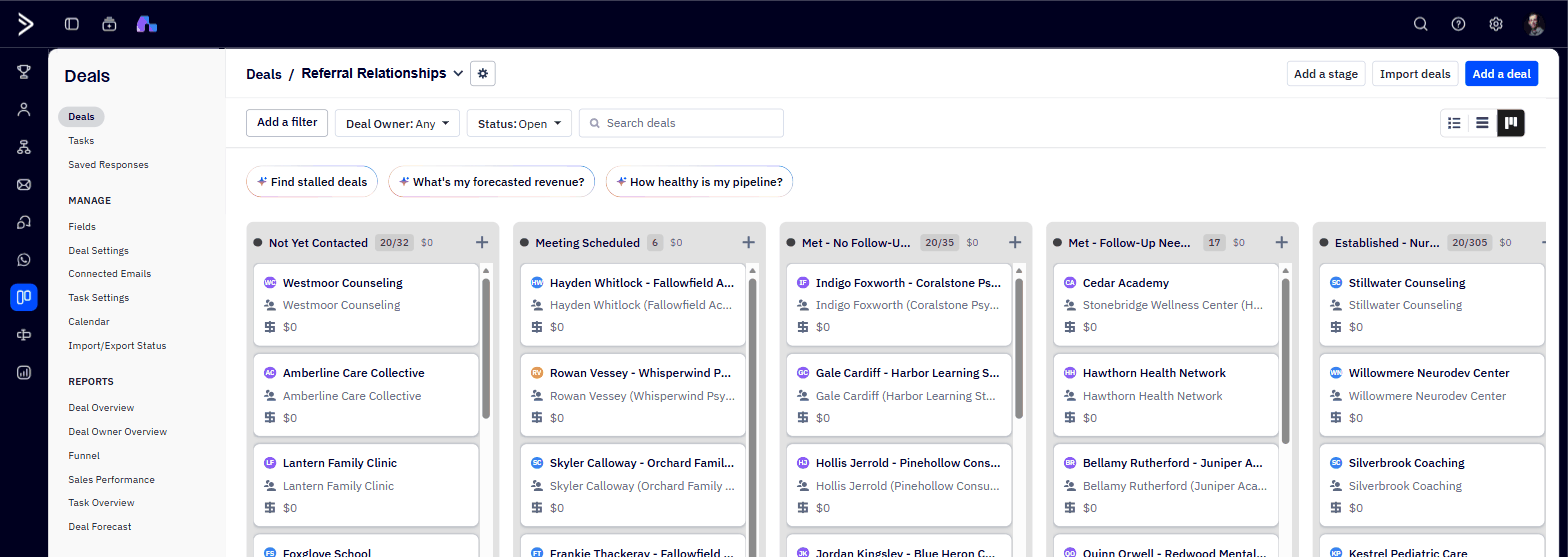
The board
Five columns, one per stage. Drag a card to say something changed.
The list
Better for scanning 395. Sort and filter by stage, owner or contact type.
Using it · 2 of 2
Put the follow-up on the record
ActiveCampaign has its own task list. Three habits make it work.
Add the task to the Deal
“Call back in a month.” “Send the new referral packet.” It lives on the relationship, so whoever opens that record next can see what was promised.
Give it a due date
The Tasks view collects everything due across all 395 relationships in one place — and it is only useful if the dates are there.
Put a name on it
Assign it to whoever should do it. A follow-up with an owner survives that person being on leave; one without an owner does not.
Your turn
One workbook. Seven tasks. Start at the top.
Every row appears in one task only, so nothing is asked twice. Type into the shaded columns. Send it back part-done — you do not have to finish it in one sitting.
Missing contact details
Give us an email or a direct phone. The only task that adds records.
80 peopleWho is this?
A job title or a link, but the row never named anyone.
29 rowsWhich organization?
Name their clinic or school — or mark them solo.
40 peopleSame organization?
One place written more than one way. Which name do we keep?
10 groupsWhich details are right?
Rows disagree on an address, an email or a website.
12 orgsAge ranges
Check what we made of your free text. Our four doubts are at the top.
55 linesCalls we made
Everything else we had to choose. Confirm, or correct.
12 rowsFive things to settle today
Same place, two names
“Prairie Care” and “PrairieCare”
One organization, written two ways. We merged them. Same for “Beacon Clinic” and “The Beacon Clinic”.
Same person, two rows
Heather Libbey
She appeared twice under the same email. We kept the row with her address and moved her mailing history onto it, so she keeps all of it. Is that the right one?
One person, two organizations
Danielle Selcer
ActiveCampaign only lets a person belong to one place, so her record shows CERI Tutor. Both relationships are tracked correctly. Should it be Prodeo Academy instead?
Dates that look filled down
164 of your dates say 1 January 2026
58% of every “date of initial contact” in the sheet. 123 of them are now in ActiveCampaign. We imported them exactly as written — it is your record, not ours to correct. If they are wrong, we can fix them.
The only one that gets harder the longer it waits
260 relationships are parked on Michael
Your sheet did not say who owns them, so they went to one place rather than nowhere. Someone needs to hand them out — and ActiveCampaign will not remember they were temporary.
Next
What happens next
You
- Work through the seven tasks in the workbook
- Send it back part-done — we will take it
- Hand out the 260 relationships
- Try moving a card and adding a task
Us
- Import the 80 once they come back
- Apply your corrections
- Fix anything you find wrong
Later
- Client and patient records are a separate design
- Please do not add patients to this — it is built for professional contacts only